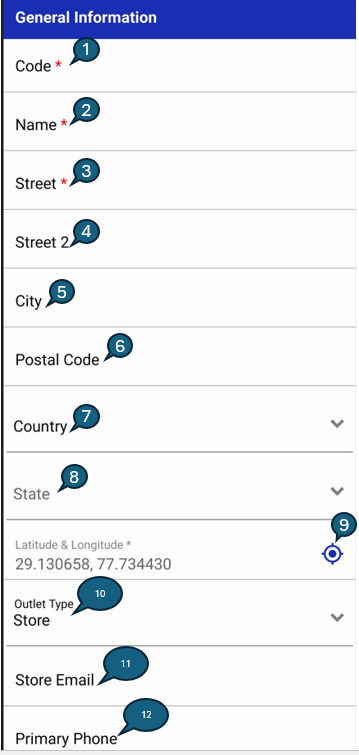
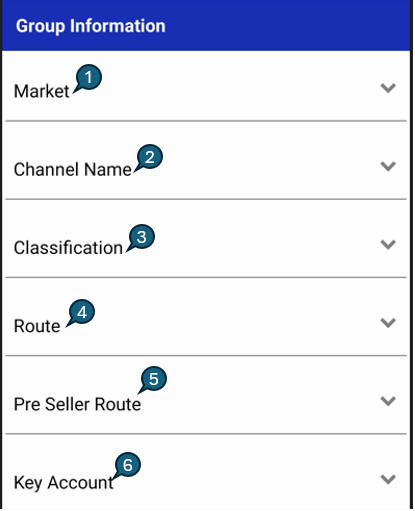
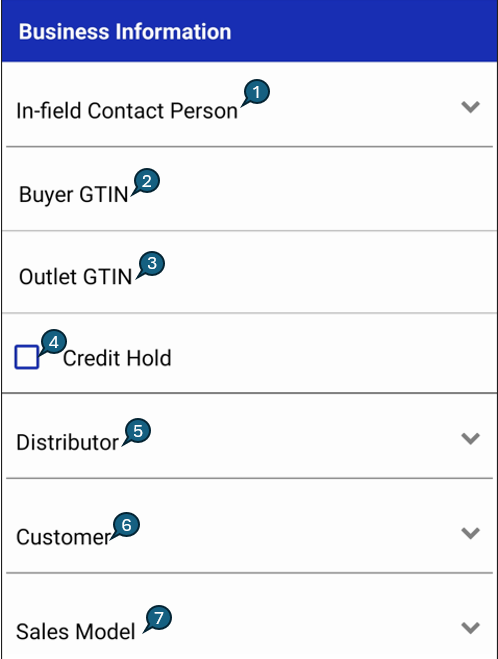
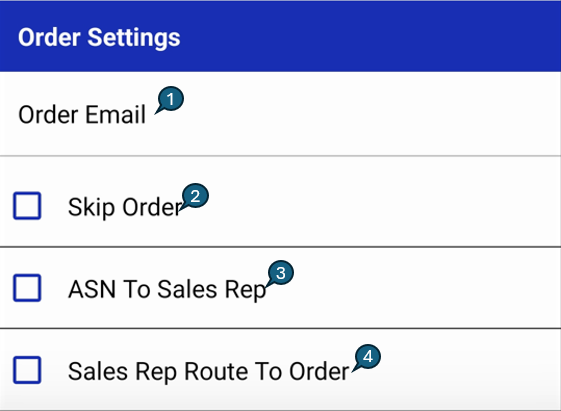
The Add Location screen allows users to register a new outlet (location) in the system by capturing comprehensive information required for operational, business, and order management activities. The screen is logically divided into multiple categories to ensure structured data entry, including General Information for basic outlet and address details, Group Information for market, channel, and routing classification, Business Information for distributor, customer, and credit-related configurations, and Order Settings to control order processing, notifications, and routing behavior. This categorization helps maintain data accuracy, improves usability, and supports efficient downstream processes such as ordering, reporting, and route planning.
| Field | Short info |
|---|
| Code | Unique code to identify the location. |
| Name | Name of the outlet (store, warehouse, etc.). |
| Street | Primary street address of the outlet. |
| Street2 | Secondary street address of the outlet. |
| City | City where the outlet is located. |
| Postal Code | Area postal/ZIP code. |
| Country | Country where the outlet is located. |
| State | State or province (select from dropdown). |
| Latitude & Longitude | The geographic coordinates of the Outlet. The GPS icon can be tapped to refresh and retrieve the latest coordinates based on the current GPS location. |
| Outlet Type | Indicates whether the outlet is a warehouse or a store. |
| Store Owner Email | Email of the store owner or manager (for orders/contact). |
| Primary Phone | Main contact number for the outlet. |
| Field | Short info |
|---|
| Market | Market or region assigned to this outlet. |
| Channel Name | Channel or sales channel (e.g., Retail, Online, Wholesale). |
| Classification | Outlet group or classification, if used. |
| Route | Delivery or service route assigned to the outlet. |
| Pre Seller Route | Pre-seller or sales route name. |
| Key Account | Main account/retail chain for the outlet (e.g., Tesco, Walmart). |
| Field | Short info |
|---|
| Infield Contact Person | Name of the person assigned to the store. |
| Buyer GTIN | Buyer's GTIN. |
| Outlet GTIN | Outlet's GTIN. |
| Credit Hold | Disable for location re order screen. |
| Distributor | Distributor for this outlet. |
| Customer | Customer associated with this outlet. |
| Sales Model | Sales model used to distribute the product. |
Order Settings
| Field | Short info |
|---|
| Order Email | Email address to receive outlet order notifications. |
| Skip Order | Checked to skip placing orders for this location. |
| ASN To SalesRep | Checked to send ASN report to the sales representative. |
| SalesRepRoute To Order | Enable sales-rep route-based order scheduling and advance email notifications before delivery (default: 1 day). |
Notes
- All required fields must be completed to enable the Create button.
- The Market field helps filter or group outlets for analysis or targeting.
- Each outlet code must be unique across the system to avoid duplication.