Survey
1. Survey Overview
The Survey feature is a structured module that enables the creation, execution, and analysis of location-based surveys. It supports multiple survey types designed to capture targeted, location-specific questionnaires, helping organizations generate actionable business insights from field operations.
Surveys are assigned to users based on location, rules, and recurrence settings, ensuring timely and relevant data collection.
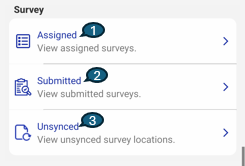
2. Assigned Surveys
The Assigned screen displays all surveys that are currently assigned to the logged-in user and are available for execution.
Key Characteristics
-
Surveys are grouped based on their recurrence pattern, such as:
- At Every Visit
- Once per Week
- Once per Quarter
- Once per Month
- Once per Year
-
This grouping helps users easily identify which surveys need to be completed during a specific visit or time period.
Navigation
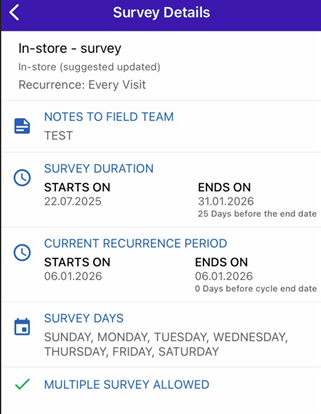
- Selecting any survey from the Assigned list navigates the user to the Survey Details screen.
Survey Details Screen
On the Survey Details screen, users can view complete information about the selected survey, including:
- Survey Name – Name of the survey
- Survey Description – Purpose and context of the survey
- Notes for Field – Instructions or guidelines for field users
- Survey Start & End Date – Validity period of the survey
- Recurrence Type – Frequency at which the survey can be performed
- Defined Days – Specific days on which the survey is applicable (if configured)
- Multiple Survey Allowed – Indicates whether multiple submissions are permitted within the recurrence period
3. Submitted Surveys
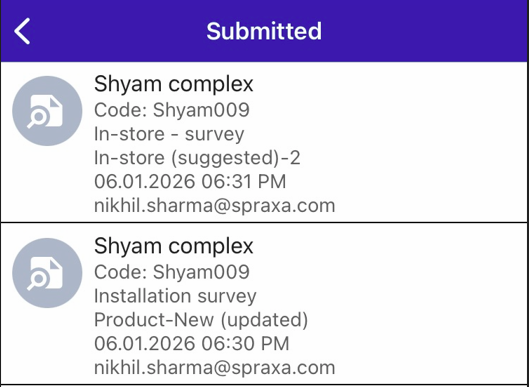
The Submitted screen displays a list of surveys that have already been completed and submitted by the currently logged-in user.
Key Characteristics
- Only surveys submitted by the same user are visible.
- This ensures clarity and avoids confusion with submissions made by other users.
Navigation
-
Clicking on any submitted survey navigates the user to a detailed view where they can review:
- Submitted survey responses
- Asset-based details linked to the survey submission
4. Unsynced Surveys
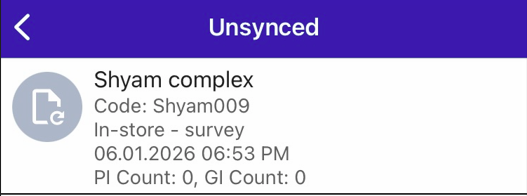
The Unsynced section displays outlets where surveys were submitted:
- In offline mode, or
- Under poor or unstable network conditions
Purpose
- Helps users and administrators identify submissions that are pending synchronization with the server.
- Ensures no survey data is lost due to connectivity issues.
Once network connectivity is restored, these surveys can be synced to complete the submission process.
5. Summary
- Assigned: View and execute surveys grouped by recurrence.
- Submitted: Review surveys completed by the logged-in user.
- Unsynced: Track surveys submitted offline or with network issues.
This workflow ensures reliable survey execution, visibility, and data integrity across all operating conditions.