Factory Install
The Factory Install process enables the secure linking of assets (coolers) with cameras at the factory level. This ensures accurate device association, traceability, and readiness before deployment.
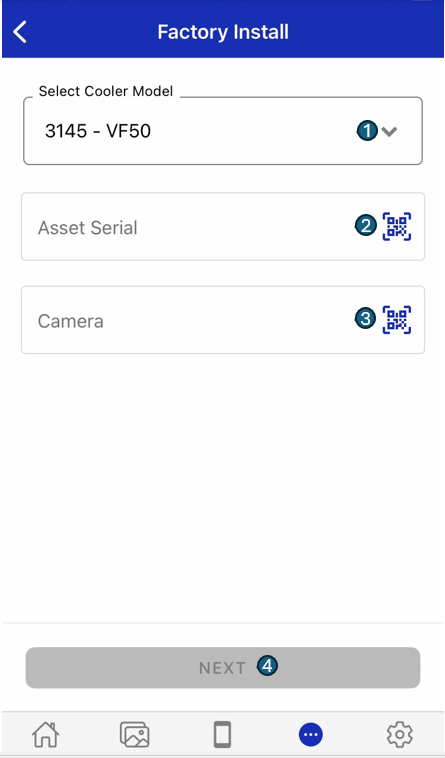
Screen Elements
1. Cooler Model
Select the appropriate cooler model from the dropdown list. This selection determines compatibility and ensures the correct camera is linked to the selected cooler type.
2. Asset Serial
Enter the unique serial number of the asset (cooler), or use the built-in scanner to capture the serial number from a barcode or QR code. This step links the camera to a specific cooler for tracking and lifecycle management.
3. Camera
Enter or scan the serial number of the CoolR Vista camera being installed. This ensures the correct camera device is associated with the selected asset.
4. Next
Tap Next to initiate the factory install process. The application validates the entered information, configures the camera, and updates system records accordingly.
By following this structured, step-by-step process, factory personnel can ensure that each camera is properly validated, accurately linked, and fully documented before leaving the factory. This approach supports end-to-end traceability, minimizes deployment errors, and maintains high standards of quality control throughout the camera lifecycle.