Cooler and Freezer OEM Integration
VistaZ Power is purpose-built for integration into commercial coolers and freezers by OEM manufacturers. This page describes how CoolR works with OEM partners to embed VistaZ Power into their product line — covering power supply requirements, physical integration, software connectivity, roles and responsibilities, and the OEM commercial program.
👈 See also: VistaZ Power Datasheet
Why Integrate VistaZ Power?
Embedding VistaZ Power transforms standard coolers and freezers into connected retail assets. OEM partners gain:
- Out-of-the-box StoreAware capability — retailers receive a camera-equipped unit with no aftermarket installation required
- Differentiated product offering — connected coolers that support automated replenishment, planogram compliance, and loss prevention
- Reduced field installation costs — factory-fitted devices eliminate per-unit field labor
- Proven certification coverage — VistaZ Power carries FCC, CE (RED), UKCA, RoHS, and UN 38.3 approvals, reducing OEM certification burden
- Controller telemetry — optionally integrate controller data alongside visual intelligence for a comprehensive asset health view
Roles and Responsibilities
A successful OEM integration depends on a clear division of responsibilities between the OEM manufacturer and CoolR. The table below outlines the default allocation; specific responsibilities may be adjusted per the commercial agreement.
| Area | OEM Responsibility | CoolR Responsibility |
|---|---|---|
| Power Supply | Input voltage range: 7–24 V DC. Recommended power: ≥18 W (e.g., 7 V / 2.5 A, 12 V / 1.5 A, or 24 V / 1 A) | Supply the standard pigtail harness (Cable 002, 3 m, 2.7 A rated) and verify compatibility during scoping |
| Mechanical Integration | Design and produce the mounting location, cable routing channels, and enclosure cutouts | Provide dimensional drawings, mounting templates, and installation guidelines |
| Factory Installation | Perform physical installation of VistaZ Power units on the production line | Train OEM line staff, supply fixtures, and provide quality acceptance criteria |
| Device Provisioning | Scan or enter device serial numbers into CoolR's factory onboarding tool at point of installation | Operate the provisioning system, supply pre-activated devices, and issue credentials |
| SIM and Connectivity | Option A: Use CoolR-supplied pre-activated SIMs. Option B: Provide OEM's own MVNO SIM cards | Manage the CoolR MVNO SIM pool and support MVNO integration for OEM-supplied SIMs |
| Certification Marking | Apply combined regulatory marks (FCC ID / CE / UKCA) as required for the finished product | Supply VistaZ Power module-level certification documentation and FCC ID / CE certificates |
| Warranty and Repair | First-line triage; escalate hardware failures to CoolR with device serial number and fault description | Honor device warranty (1 year); arrange RMA and replacement units |
| Firmware Updates | No action required; updates are delivered OTA | Manage and deploy firmware updates over-the-air to all field devices |
| Platform Access | Not required (platform is CoolR-operated) | Provide retailer or operator access to the StoreAware platform; manage data retention and security |
| Controller Integration | Provide Bluetooth handshake protocol or data parsing logic (for Mode 2) | Implement the integration in VistaZ firmware and verify end-to-end data flow |
| Regulatory Compliance (Product Level) | Ensure the finished cooler or freezer product meets all applicable local regulations | Supply compliance documentation for the VistaZ Power module; support combined filing on request |
Power Supply Requirements
VistaZ Power connects to the cooler's internal DC power rail via the standard pigtail harness (Cable 002).
Device Input Requirements
| Parameter | Requirement |
|---|---|
| Voltage Range | 7–24 V DC |
| Recommended Power Input | ≥18 W |
| Power Availability | Continuous (device manages failover internally) |
Cable 002 Harness Specifications
| Parameter | Specification |
|---|---|
| Cable Outer Diameter | 3.8 mm ± 0.15 mm |
| Conductor | 22 AWG × 2C |
| Cable Standard | UL 758 (AWM), Style UL2095 |
| Rated Current | 2.7 A |
| Temperature Rating | 80 °C |
| Voltage Rating | 300 V |
| Flame Rating | VW-1 |
| Operating Temperature | −20 °C to +80 °C |
| Compliance | RoHS, REACH (SVHC) |
| DC Plug Rating | ≥30 V, ≤3 A, center positive, nickel-plated contacts |
| Length | 3 m |
Battery Backup: VistaZ Power includes an internal battery that automatically activates if DC power is interrupted, providing more than 1 month of backup operation at 1 capture per day. No external UPS or redundancy is required from the OEM.
Physical Integration
Form Factor
| Parameter | Specification |
|---|---|
| Dimensions | 183.6 × 42.1 × 28.3 mm |
| Weight | 123 g |
| Enclosure Rating | IP67 |
| Operating Temperature | −20 °C to +50 °C |
VistaZ Power's slim profile — approximately half the width of the standard VistaZ — is optimized for mounting inside cooler doors and chest freezer lids.
Mounting Configurations
Vertical (Glass Door Cooler)
- Mount inside the door frame, routing the DC pigtail cable through the door gasket
- The IP67-rated enclosure is fully compatible with condensation-prone environments
Horizontal (Chest Freezer)
- Mount along the interior lid or upper wall, routing the DC cable internally
- Wide operating temperature range supports both standard refrigeration (0–10 °C) and deep-freeze (−18 °C to −25 °C) environments
Installing the DC Plug with O-ring on VistaZ Power
Inserting the O-ring into the DC plug
-
Locate and pull the DC plug from the door gasket.
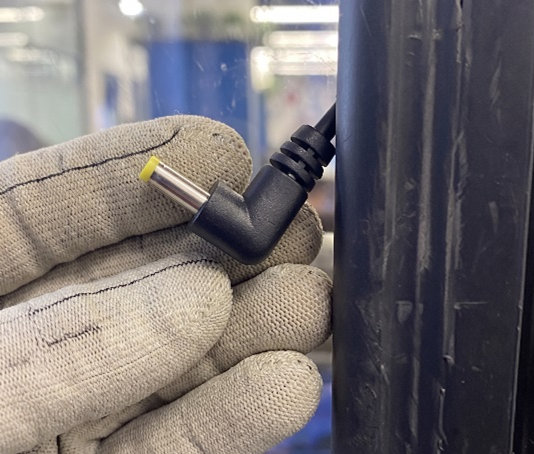
-
Remove the protective sheet from the O-ring adhesive, then insert the O-ring into the DC plug.
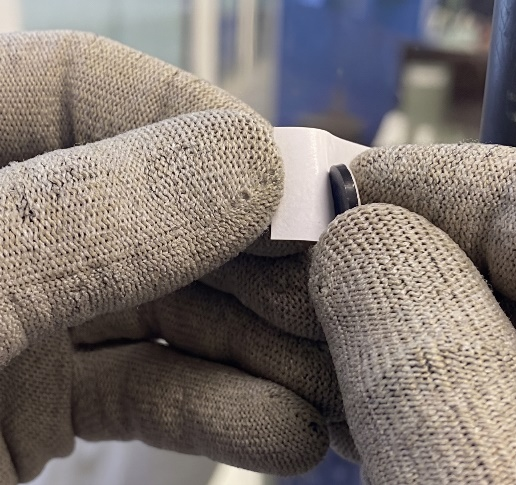
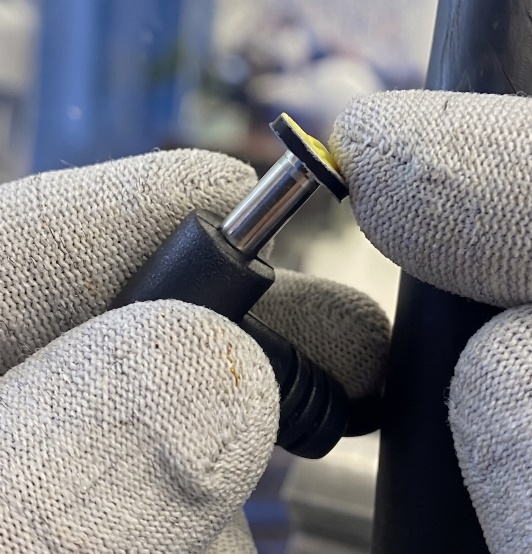
-
Ensure the O-ring sits flat.
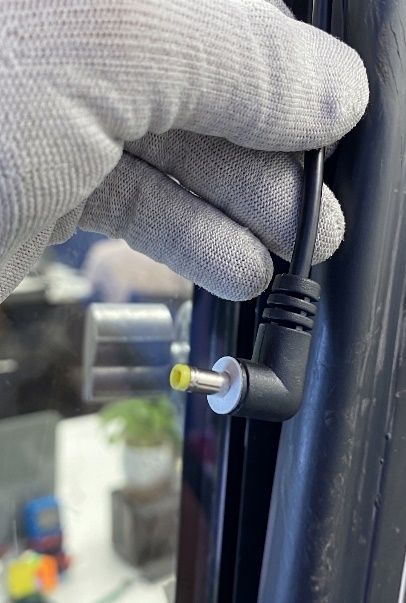
Installing the DC plug into VistaZ Power
-
Remove the protective film from the DC plug cable.
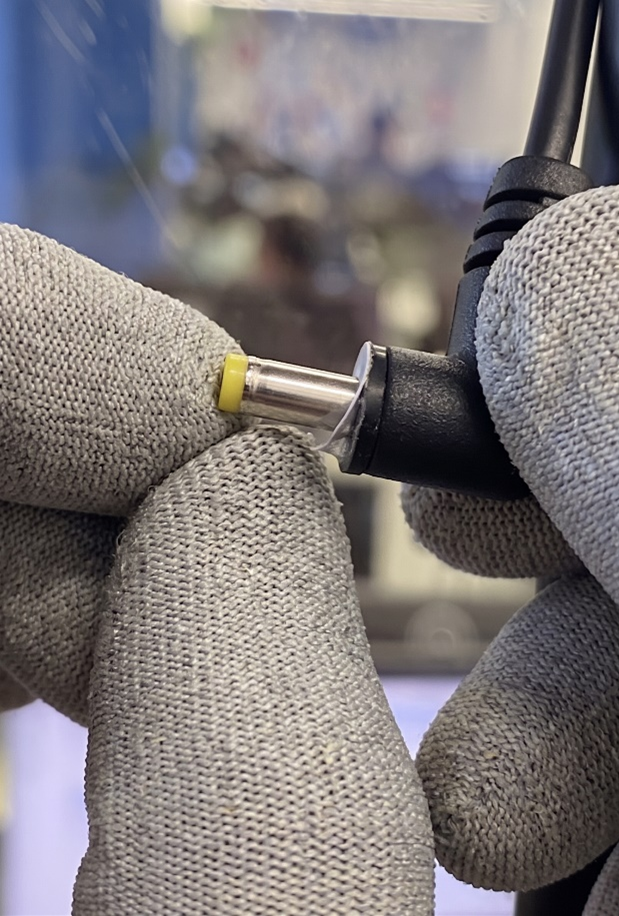
-
Insert the DC plug into VistaZ Power.
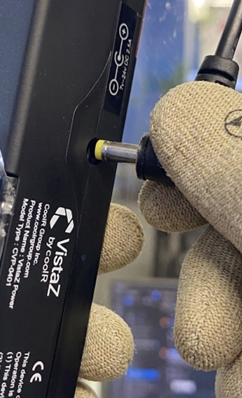
Gently push the DC power barrel plug straight into the device's power input socket (located on the side of the VistaZ Power unit). Apply steady, even pressure until the plug is fully seated. The O-ring adhesive will seal against the device enclosure.
-
Verify the DC plug is connected to VistaZ Power.
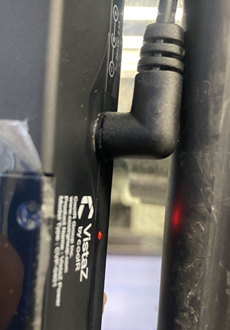
Once the plug is fully inserted, check the red LED indicator near the DC plug insertion point. A red LED confirms the device is receiving power and the connection is successful. Verify that there is no wobble or looseness in the DC plug.
Camera Placement
The 5 MP camera features a 210° diagonal field of view. Optimal placement is at the top center of the cooler interior, facing the product shelf, to maximize shelf coverage in a single frame.
Connectivity
VistaZ Power connects to the CoolR cloud and, optionally, to the cooler's refrigeration controller.
| Technology | Details |
|---|---|
| Cellular | LTE Cat-1 bis (primary cloud uplink) |
| LTE-FDD Bands | B1 / B2 / B3 / B4 / B5 / B7 / B8 / B12 / B13 / B17 / B18 / B19 / B20 / B25 / B26 / B28 / B66 |
| LTE-TDD Bands | B34 / B38 / B39 / B40 / B41 |
| Wi-Fi | IEEE 802.11 b/g/n (alternative or supplemental uplink) |
| Bluetooth | BLE 5.4 (local configuration and controller integration) |
| GNSS | GPS, GLONASS, BDS, Galileo, QZSS (asset location) |
| SIM | Nano SIM (CoolR-managed or OEM-managed MVNO) |
Controller Integration (Optional)
VistaZ Power can act as an IoT gateway for compatible refrigeration controllers via Bluetooth. Two integration modes are supported:
Mode 1 — Transparent Gateway (Recommended)
VistaZ passes raw controller data directly to the OEM's cloud endpoint via CoolR cloud without parsing or storing the payload. This approach protects OEM intellectual property.
Mode 2 — Edge Intelligence
VistaZ decodes selected telemetry fields (e.g., temperature logs, door events, fault codes) and presents them in the CoolR dashboard alongside visual inventory data.
For full details, see Controller Integration and Telemetry.
OEM Commercial Program
CoolR's OEM program supports volume integration, co-branding, and flexible fulfillment options.
Program Options
| Option | Description |
|---|---|
| Factory-Fit Integration | VistaZ Power units supplied to OEM manufacturing facilities for in-line installation |
| Bundled SKU | OEM products offered as a single connected SKU through CoolR's retail channel partnerships |
| White-Label Platform | CoolR StoreAware platform branded under OEM or retailer identity (available for qualified partners) |
| MVNO SIM Provisioning | CoolR can provide pre-activated SIMs on a managed MVNO, or integrate with OEM's preferred mobile carrier |
Certification and Compliance Support
VistaZ Power's existing certifications (FCC, CE/RED, UKCA, RoHS, UN 38.3) are available to OEM partners as part of the integration program. CoolR's engineering team supports product integration, combined FCC/CE filing where applicable, and factory acceptance testing.
Getting Started
To begin an OEM integration evaluation:
- Engage CoolR Sales — share your cooler or freezer product line and target markets.
- Technical Scoping — CoolR's engineering team assesses power supply compatibility, mounting options, and connectivity requirements.
- Integration Pilot — receive pre-production VistaZ Power units for factory fit-testing.
- Commercial Agreement — agree on volume, pricing, SIM provisioning, platform access terms, and responsibility allocation.
- Production Rollout — factory-fit integration with CoolR quality acceptance testing.
Contact
| Function | Contact |
|---|---|
| OEM Sales and Partnerships | sales@coolrgroup.com |
| Technical Integration Support | support@coolrgroup.com |
ℹ When contacting us, include your product model, estimated annual volume, target markets, and any existing controller or connectivity stack details to expedite the scoping process.