Overview
The No. of Child Assets setting allows you to define how many additional doors or compartments a cooler contains.
When a cooler has multiple doors or compartments, the system automatically creates and manages them based on the value entered in this field.
This configuration supports both Vertical Coolers and Horizontal Coolers.
Understanding Child Assets
A cooler consists of:
- 1 Main Asset (the primary cooler)
- 0 or more Child Assets (additional doors or compartments)
The total number of doors is calculated as:
Total Doors = 1 Main Asset + Number of Child Assets
Examples
| No. of Child Assets | Cooler Configuration | Total Doors |
|---|---|---|
| 0 | Single Door Cooler | 1 |
| 1 | Double Door Cooler | 2 |
| 2 | Triple Door Cooler | 3 |
| 3 | Four Door Cooler | 4 |
| 4 | Five Door Cooler | 5 |
Vertical Cooler Configuration
Double Door Coolers
When No. of Child Assets = 1, the system creates a second door automatically.
Door Handle Assignment
| Main Door Handle | Second Door Handle |
|---|---|
| Left | Right |
| Right | Left |
This ensures that door handles are positioned correctly on opposite sides.
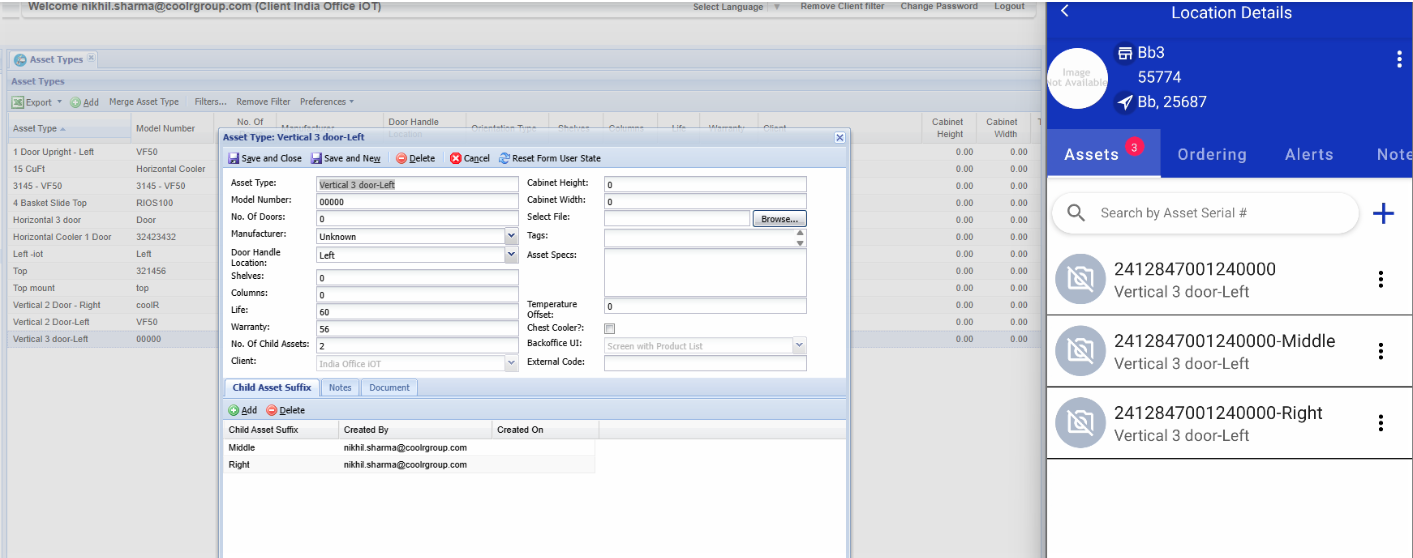
Triple Door Coolers
When No. of Child Assets = 2, the system automatically assigns door positions.
If Main Door Handle = Left
| Door | Position |
|---|---|
| Main Door | Left |
| Door 2 | Middle |
| Door 3 | Right |
If Main Door Handle = Right
| Door | Position |
|---|---|
| Main Door | Right |
| Door 2 | Middle |
| Door 3 | Left |
Multi-Door Coolers
For coolers with more than three doors, the system automatically creates and arranges the additional doors in sequence.
Example:
| Child Assets | Total Doors |
|---|---|
| 3 | 4 Doors |
| 4 | 5 Doors |
| 5 | 6 Doors |
Horizontal Cooler Configuration
Horizontal coolers use compartment positions instead of door handles.
Two-Compartment Cooler
When No. of Child Assets = 1:
| Main Position | Additional Position |
|---|---|
| Shelf | Bottom |
| Under Shelf | Bottom |
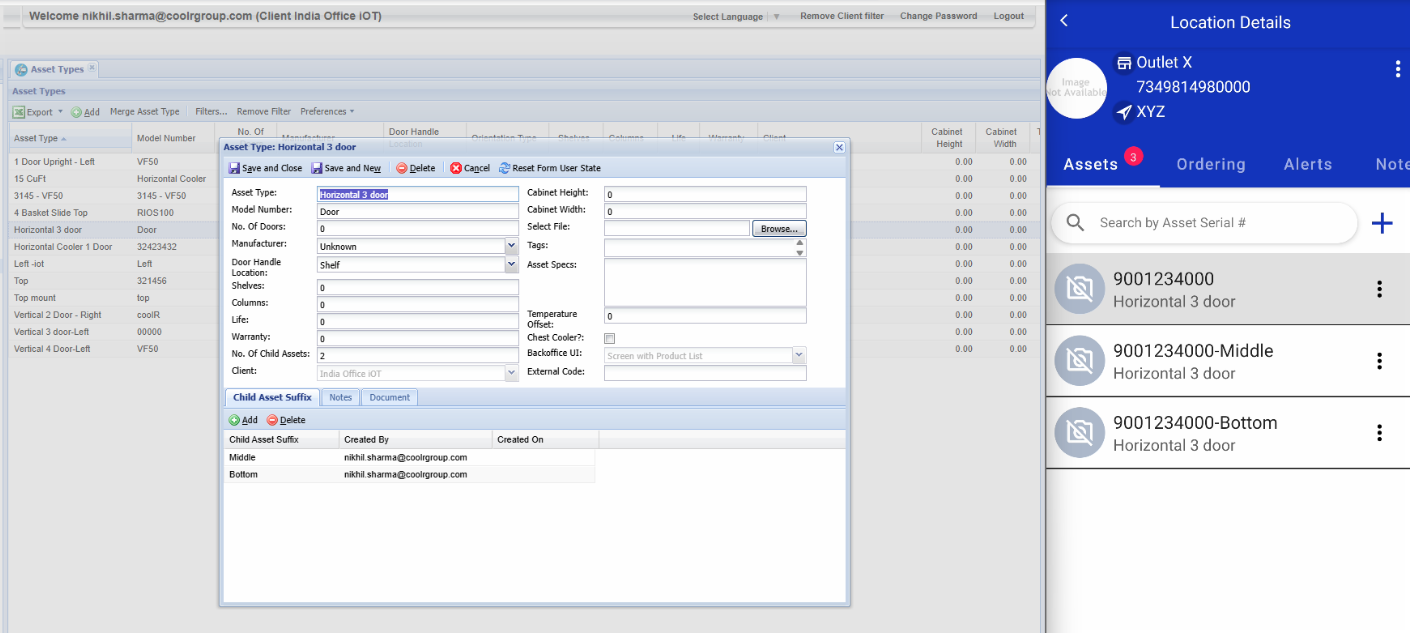
Three-Compartment Cooler
When No. of Child Assets = 2:
| Compartment | Position |
|---|---|
| Main | Shelf / Under Shelf |
| Second | Middle |
| Third | Bottom |
Updating Child Asset Count
Increasing the Count
When the number of child assets is increased:
- Additional doors or compartments are created automatically.
- Existing configurations remain unchanged.
Decreasing the Count
When the number of child assets is reduced:
- Extra doors or compartments are removed automatically.
- The system maintains a valid cooler structure without creating duplicate or unused records.
Installation Experience
During installation and asset management:
- All configured doors and compartments are displayed automatically.
- The relationship between the main cooler and additional doors/compartments is maintained by the system.
- No manual creation of additional doors is required.
Important Notes
- The default value for No. of Child Assets is 0.
- Only numeric values are accepted.
- Main door handle location remains as configured on the main asset; additional doors/compartments are positioned automatically.
- Child assets are created and maintained automatically by the system.
- Users only need to specify the required number of doors or compartments.