
Appearance
Reorder: order movement and credit hold
Use Reorder to review suggested orders, schedule them for fulfillment, and follow their progress. Available actions depend on your permissions and your account's configuration.
Order movement at a glance
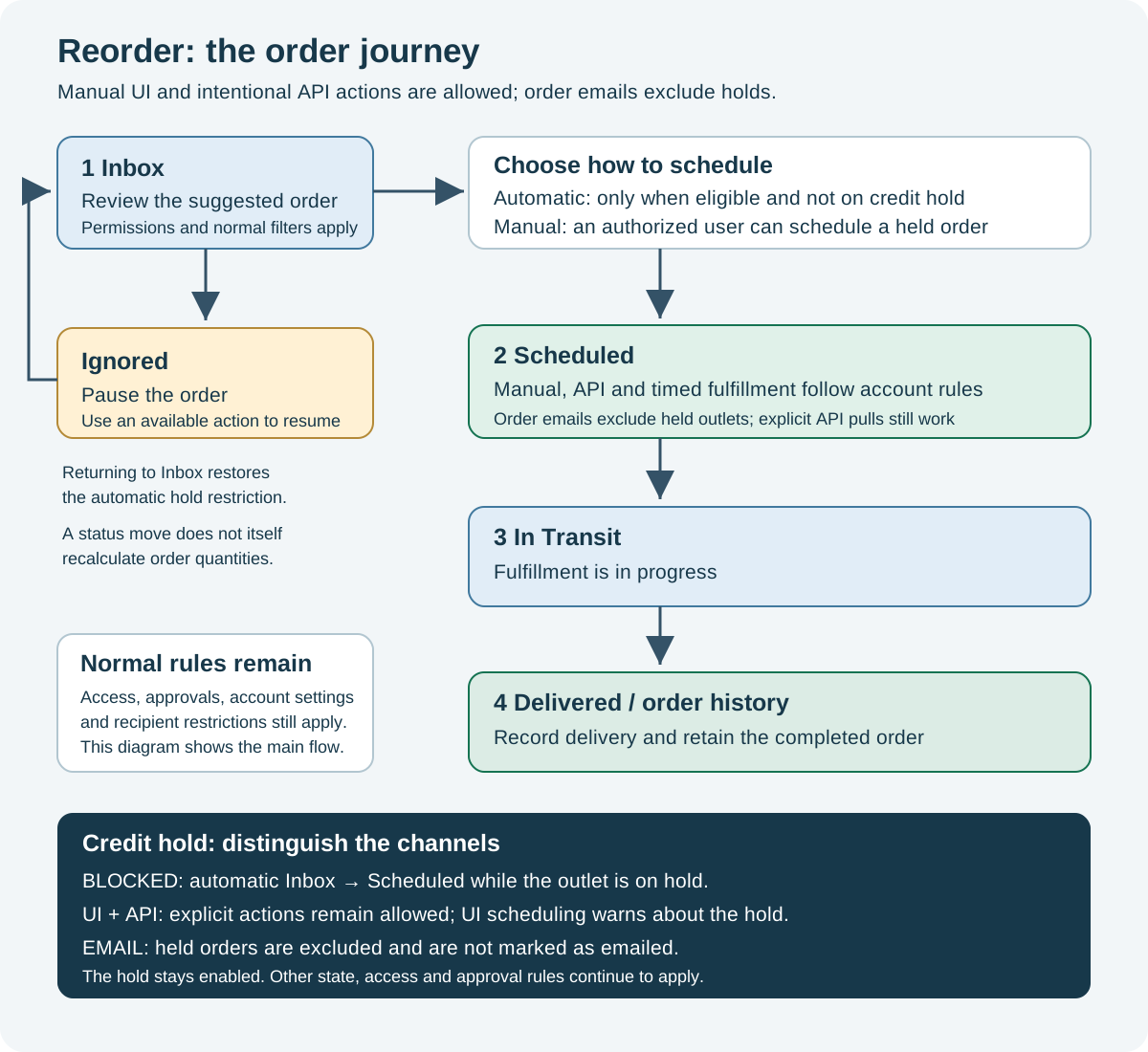
Open the full-size order-flow infographic.
| State | What it means | What happens next |
|---|---|---|
| Inbox | An order suggestion is available for review. | Review or edit it, move it to Scheduled, or use the available Ignore action. Configured automation can schedule eligible orders. |
| Scheduled | The order is selected for fulfillment. | Configured reports and distributor integrations can process it. A configured integration, timer or authorized action can move it to In Transit. |
| In Transit | Fulfillment is in progress. | Record delivery through the available delivery workflow. |
| Ignored | The order is paused. | An authorized action or configured automation can return it to the workflow. |
| Delivered / order history | Delivery is complete. | Review the completed order in history. |
This diagram shows the main business flow, not every available status action. Moving an order back to Inbox does not itself recalculate the suggested quantities. Review its quantities and calculation timestamp before scheduling it again.
Credit hold: automatic scheduling and the manual exception
Credit hold prevents an order from moving automatically from Inbox to Scheduled. An authorized user can still deliberately move that order from Inbox to Scheduled.
Held outlets remain visible with a Credit Hold marker. When scheduling one, review the warning and explicitly choose Schedule despite credit hold. The manual action changes the order's state; it does not remove the outlet's hold.
Distributor requests and order emails
Intentional API requests and movements remain allowed for credit-held orders. An intentional distributor order pull is an explicit action: its existing workflow can move eligible Scheduled orders to In Transit, including held orders. Normal access, account, state and approval rules still apply.
Order emails exclude credit-held orders, even when someone manually scheduled the order. Their report data is excluded and those held orders are not marked as emailed through that report.
Authorized manual status changes and configured timed movement still follow the account's normal workflow. A later hold does not cancel or recall the order, or recall data already selected or sent. There is no additional interruption of an operation already in progress.
After credit hold is removed, the order must still meet the email report's usual state, approval, access and other selection rules. Removing the hold does not itself resend an email or change the order's state.
The manual action applies to the order being scheduled. It does not remove the outlet's credit hold or make future Inbox orders eligible for automatic scheduling. If an order returns to Inbox while the hold remains enabled, it cannot be scheduled automatically.
Example
An outlet has credit hold enabled and an order in Inbox:
- The automatic scheduling run leaves that order in Inbox.
- An authorized user reviews the order and manually moves it to Scheduled.
- The order remains visible with its Credit Hold marker. Explicit API actions, including the normal distributor pull, and permitted manual/timed movements remain available. Order emails exclude it while the hold is enabled.
- The outlet remains on credit hold. Future Inbox orders still require an authorized manual scheduling action while that hold is enabled.
Permissions and other filters still apply
The exception changes credit-hold handling only. It does not bypass outlet access, account eligibility, approvals, recipient restrictions or other configured rules.
Different screens, reports and integrations can use different status and selection filters. Their complete order lists are not guaranteed to be identical. Check the selected state, account, market and other filters when comparing them.
If you cannot find an order or an expected action, check your filters and permissions with your administrator. Do not remove credit hold merely to force an order through the workflow.
See Ordering & Replenishment for recommendation models and Scheduled Order Report for the report overview.