
Appearance
Outlet Groups: assign surveys to many outlets at once
An outlet group is a named list of outlets, such as a chain, a region or a pilot set of stores. When you create a survey, you can assign the group instead of picking outlets one by one, and the same group can be reused by several surveys. Groups are optional: you can also assign single outlets, or all outlets.
Who uses it: client administrators and administrators. Where: StoreBuddy › Outlet Groups.
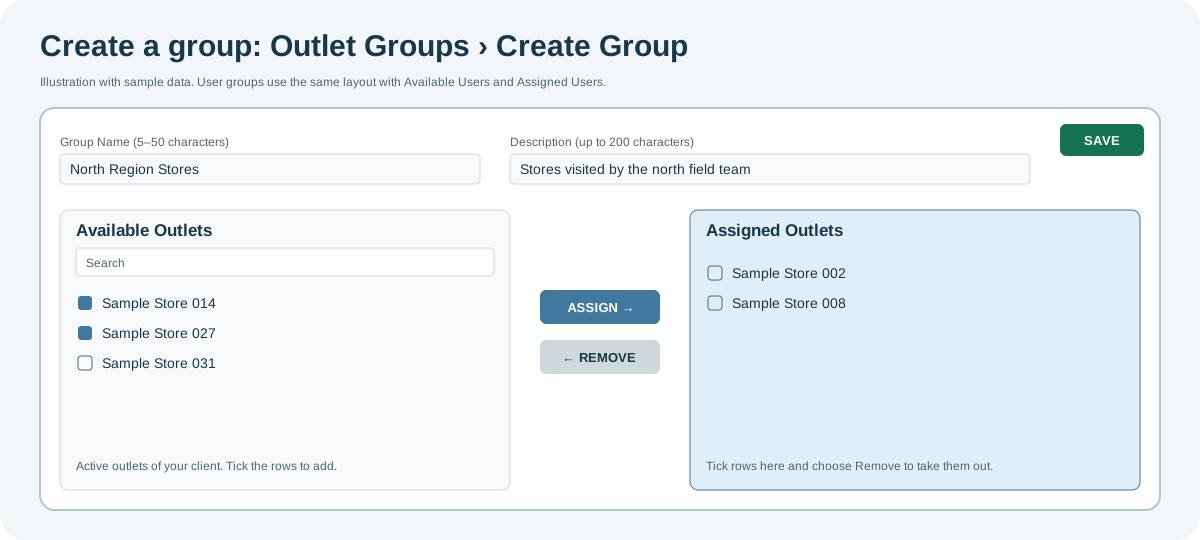
Create an outlet group
- Select Create Group.
- Enter a Group Name (5–50 characters) and a description (up to 200 characters).
- In Available Outlets, search, tick the outlets you want and select Assign. Repeat as needed.
- Select Save. The group appears in the overview.
Manage outlet groups
- Change a group: select its edit action, then use Assign or Remove and Save.
- From the overview you can also copy, deactivate, filter, export and delete groups. A group that has survey activity may not be deletable; deactivate it instead.
Related
- User Groups work the same way for users.
- Surveys: assign the group in Step 2: Assign Outlets.