
Appearance
Devices: view and maintain your cameras and smart devices
A device is a camera, sensor or gateway, such as a VistaZ camera, that sends images and data from a cooler. The Devices screen lists your devices, the outlet and asset each one is linked to, and its recent activity.
Devices at a glance
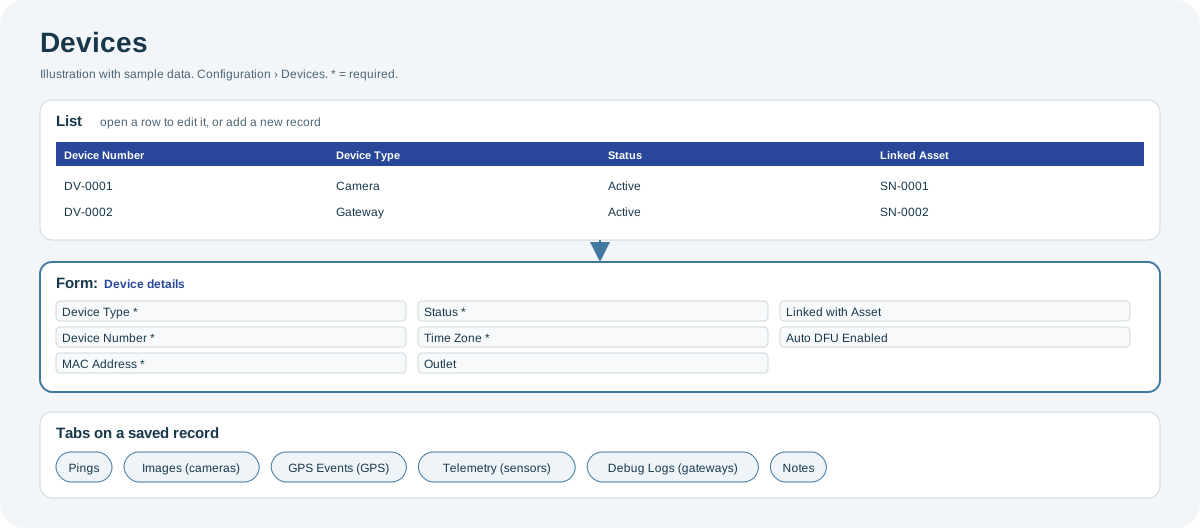
Open the full-size Devices diagram.
When to use it
To check a device's status and links, to find the asset and outlet it belongs to, or to review its recent pings, images and events when a cooler stops reporting.
Who uses it
| Role | Typical use |
|---|---|
| Deployment and support teams | Check device status, links and activity. |
| Asset managers | Find which device is in which cooler. |
Why it helps
- Find the device behind a problem: status, last activity and links on one screen.
- Activity in one place: pings, images and events for each device.
Where to find it
Select Configuration > Devices.
How it works
A device is linked to an asset when the camera is installed, usually with the CoolR mobile app. See Installation Process.
Using the screen
Device details
| Field | Notes |
|---|---|
| Device Type, Device Number, MAC Address | Identify the device. Required. |
| Status, Time Zone, CoolR Client | Required. |
| Outlet, Linked with Asset | Where the device is installed. |
| Manufacturer Serial Number, Firmware Version | Hardware details. |
| IMEI, SIM Number | Shown for devices with a SIM card. |
| Hub Location in Cooler, Linked Smart Device | Shown for gateways. |
| Auto DFU Enabled | Lets the device receive firmware updates automatically. On by default. |
| Tags | Free labels for searching and grouping. |
Activity tabs
A saved device has tabs that depend on its type: for example, Pings, Images and Image Events for cameras; GPS Events for devices with GPS; Telemetry and Door Status for cabinet sensors; and Debug Logs for gateways. All devices also have Notes and Attachments.
Why you might not see something
- Device type, number, MAC address, serial number and firmware are read-only for client users: these identify the device, and only CoolR can change them.
- Delivery, installation and warranty dates are missing: only administrators see them.
- A tab is missing: the device type does not support it.
Related pages
Last updated: November 13, 2026. Screens and options vary with your role and your organization's setup.