
Appearance
Delivery Compliance: compare suggested and delivered orders
The Delivery Compliance dashboard compares the products and cases Playbook suggested for each cabinet with what was actually delivered. It also shows how many cabinets are subscribed and sending images, and why subscribed cabinets received no order.
Delivery Compliance at a glance
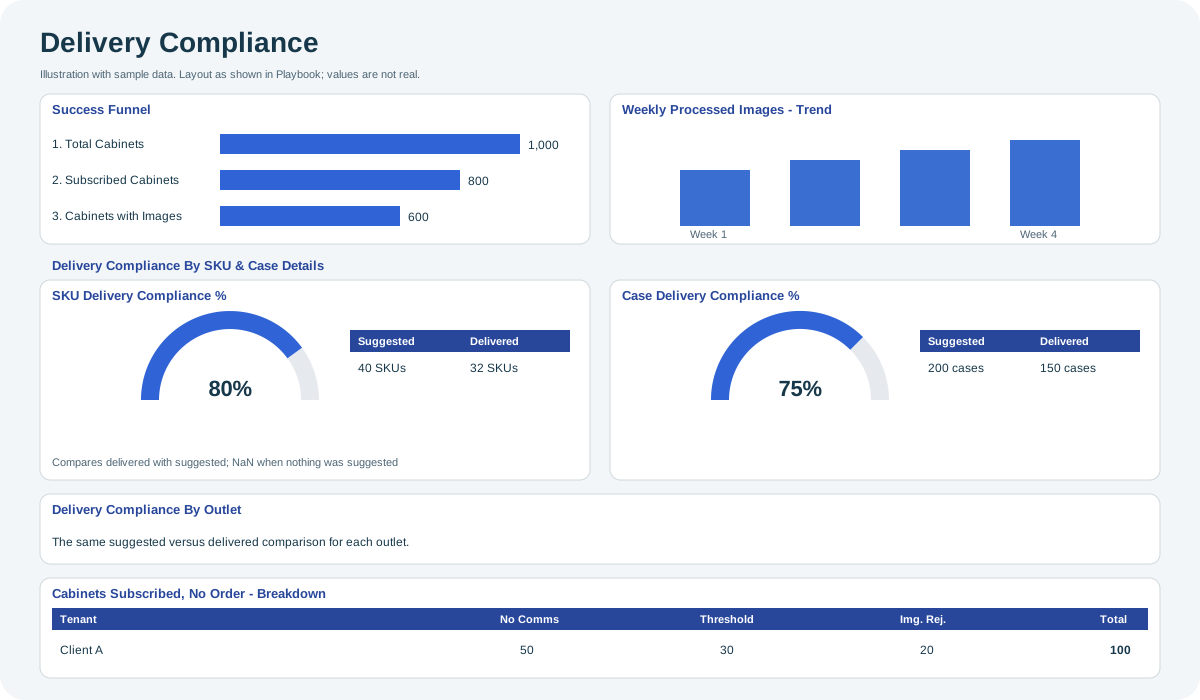
Open the full-size Delivery Compliance diagram.
When to use it
Use it to check whether deliveries follow the order suggestions and to find subscribed cabinets that received no order.
Who uses it
| Role | Typical use |
|---|---|
| Distribution and replenishment managers | Measure how closely deliveries follow suggestions. |
| Account managers | Explain to a client why some cabinets received no order. |
Where to find it
Select Dashboard > Delivery Compliance in the menu. Its Client filter starts with all the clients you can access. See Dashboards. For how suggestions are created and reviewed, see Ordering & Replenishment and Reorder.
Using the screen
Success Funnel and image trend
- Success Funnel: Total Cabinets, then Subscribed Cabinets, then Cabinets with Images.
- Weekly Processed Images - Trend: number of images processed each week.
Delivery Compliance By SKU & Case Details
- SKU Delivery Compliance % and Case Delivery Compliance %: gauges from 0 to 100 that compare delivered with suggested products (SKUs) and cases. A gauge shows NaN (no value) when there are no order suggestions to compare.
- SKUs sugg vs delivered and Cases by SKU sugg / delivered: the Suggested and Delivered totals behind each gauge.
- Delivery Compliance By Outlet: the same comparison for each outlet.
Cabinets Subscribed, No Order - Breakdown
For each client (Tenant), the number of subscribed cabinets that received no order, by reason:
| Column | Reason |
|---|---|
| No Comms | The cabinet did not communicate. |
| Threshold | The cabinet did not reach the order threshold. |
| Img. Rej. | The cabinet's images were rejected. |
| Total | All subscribed cabinets with no order. |
Why you might not see something
- Gauges show NaN and tables show N/A: there are no order suggestions for the selected period and filters.
- "No results were returned for this query": no outlets match the selected period and filters.
- A client is missing: you do not have access to it, or the Client filter excludes it.
Related pages
Last updated: November 12, 2026. Screens and options vary with your role and your organization's setup.