
Appearance
Outlets: maintain your store master data
An outlet is a store where coolers are placed. Use this screen to maintain outlet master data: address, grouping, and business and order settings. To review an outlet's performance, images and orders, use the Outlets screen instead.
Outlets at a glance
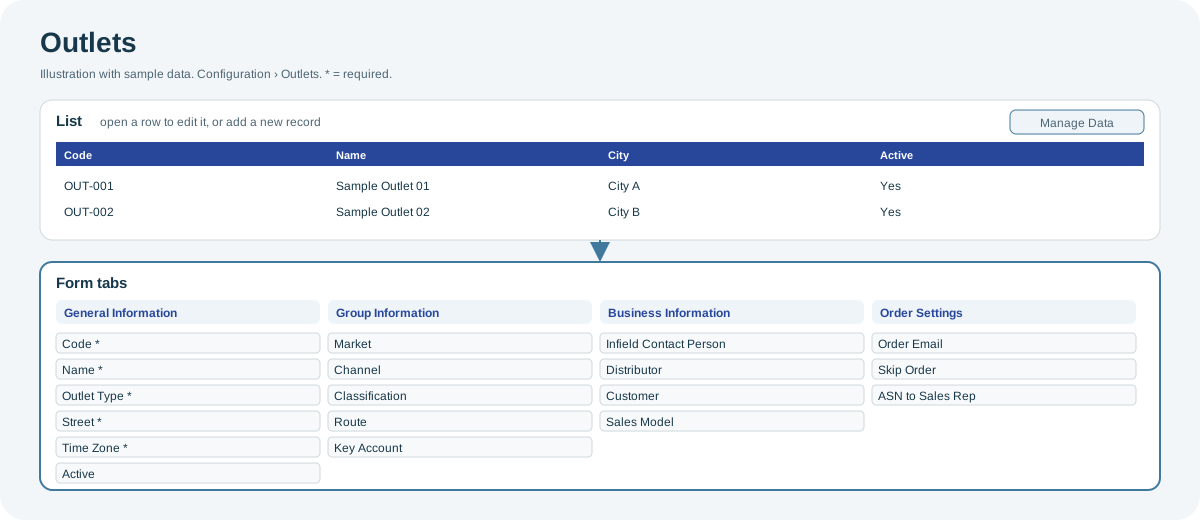
Open the full-size Outlets diagram.
When to use it
When stores open or close, when an address or contact changes, or when outlets move to another market, route or distributor.
Who uses it
| Role | Typical use |
|---|---|
| Organization administrators | Add outlets and keep addresses and grouping current. |
| Sales operations | Maintain routes, distributors and order settings. |
Why it helps
- Reliable filters: market, channel, classification, route and key account drive the filters across Playbook.
- Correct orders: order settings determine who receives the outlet's orders.
Where to find it
Select Configuration > Outlets.
Using the screen
Outlet form
| Tab | Main fields |
|---|---|
| General Information | Code, Name, Outlet Type, Street and Time Zone (required), address, latitude and longitude, Store Owner, Active, Primary Phone, External Code, Tags. |
| Group Information | Market, Channel, Classification, Route, Pre Seller Route, Key Account. |
| Business Information | Infield Contact Person, Distributor, Customer, Sales Model. |
| Order Settings | Order Email, Skip Order, ASN to Sales Rep, Sales Rep Route to Order. |
Import
Use Manage Data to import outlets from Excel. The mandatory columns are outlet code, name, city, street and active status. See Manage Data: import and export.
Why you might not see something
- A market, channel or route is missing from a list: it has not been set up for your organization.
- You cannot add or edit outlets: your role can only view them.
Related pages
Last updated: November 13, 2026. Screens and options vary with your role and your organization's setup.