
Appearance
Availability COTC + NPD: availability of focus products in each cabinet
The Availability COTC + NPD dashboard shows the availability of two groups of focus products in your cabinets: COTC products and NPD products. Which products belong to each group is set up for your organization; the Product Category column shows each product's group.
Availability COTC + NPD at a glance
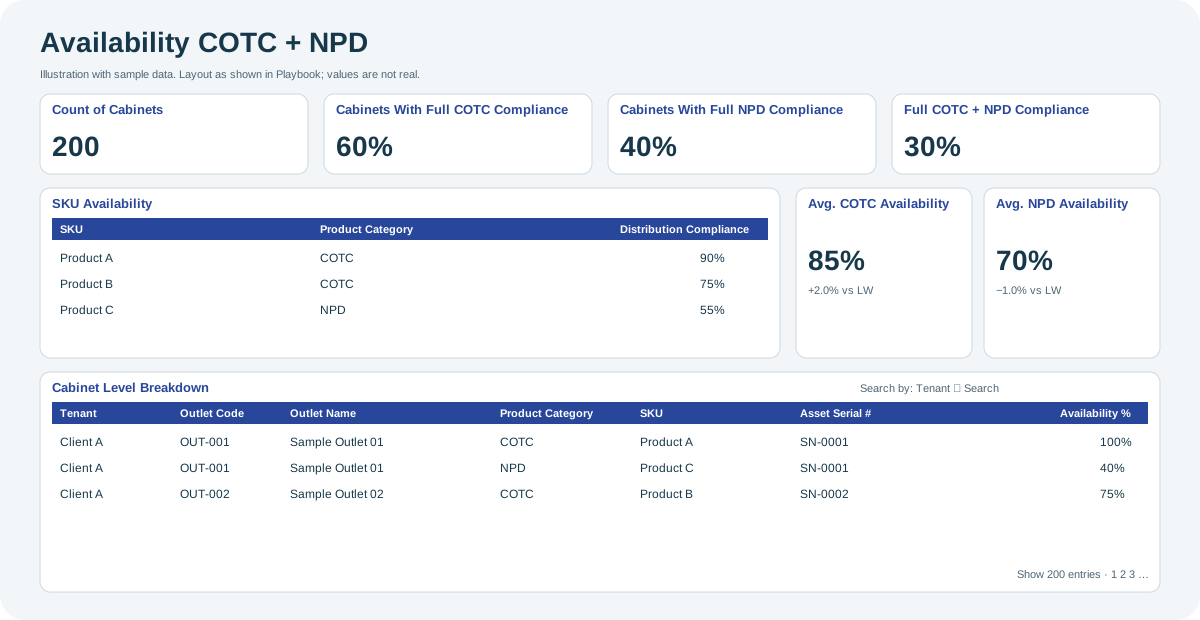
Open the full-size Availability COTC + NPD diagram.
When to use it
Use it to check whether your most important products, such as a core range or new launches, are present in your cabinets, and to find the cabinets and products that need attention.
Who uses it
| Role | Typical use |
|---|---|
| Category and brand managers | Track availability of the core range and of new products. |
| Sales and merchandising teams | Find cabinets missing focus products. |
Where to find it
Select Dashboard > Availability COTC + NPD in the menu. Its Client filter starts with all the clients you can access. See Dashboards.
Using the screen
Summary cards
| Card | Shows |
|---|---|
| Count of Cabinets | Number of cabinets included. |
| Cabinets With Full COTC Compliance | Share of cabinets with full compliance for COTC products. |
| Cabinets With Full NPD Compliance | Share of cabinets with full compliance for NPD products. |
| Cabinets With Full COTC + NPD Compliance | Share of cabinets with full compliance for both groups. |
| Avg. COTC Availability / Avg. NPD Availability | Average availability of the group, with the change versus last week (vs LW). |
SKU Availability
One row per product (SKU), with its Product Category (COTC or NPD) and its Distribution Compliance.
Cabinet Level Breakdown
One row per product in each cabinet, with Tenant, Outlet Code, Outlet Name, Product Category, SKU, Asset Serial # and Availability %.
To find rows, choose a column in Search by and type in Search. You can also choose how many entries to show per page and sort by any column.
Why you might not see something
- A product is missing: it is not in your organization's COTC or NPD group.
- A client is missing: you do not have access to it, or the Client filter excludes it.
Tips
- Sort the Cabinet Level Breakdown by Availability % to list the cabinets and products with the lowest availability.
Related pages
Last updated: November 12, 2026. Screens and options vary with your role and your organization's setup.